
X-PLANE 12
Connect over your LAN.
Install the G5 companion plugin on your Windows or Linux simulator PC, connect Ethernet and let the instrument discover X-Plane.
View setup resourcesG5 SIMULATOR INSTRUMENT
A compact flight display with a knob you can turn and a panel you can make your own. Switch between primary flight and navigation views in one instrument.
Independent simulator accessory. Release details and pricing to be announced.
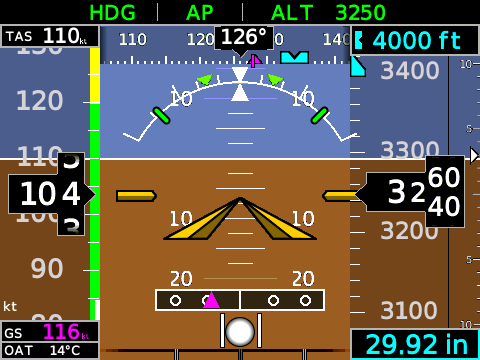
Software display demonstration with simulated flight data. Concept enclosure; final hardware may differ.
REACH. TURN. FLY.
Bring the essential instruments off your main screen and into your cockpit.
Attitude, airspeed, altitude and vertical speed, with available flight-director and autopilot indications from your simulator.
Heading, course and available GPS, VOR or localizer guidance. Choose the HSI page whenever you need it.
Adjust pressure, selected heading and supported menu values with the rotary knob. Press to select; turn to set.
CONNECT TO YOUR SIMULATOR
X-PLANE 12
Install the G5 companion plugin on your Windows or Linux simulator PC, connect Ethernet and let the instrument discover X-Plane.
View setup resourcesMSFS 2024
The Windows G5 Bridge connects MSFS 2024 to the instrument and discovers units on your local network. Windows 10/11, 64-bit.
View bridge resourcesSupports X-Plane 12 and MSFS 2024 on the platforms above. Available indications and controls depend on the aircraft. Final mounting and power specifications will accompany the finished product.
SEE IT IN MOTION
The built-in demonstration runs a repeating flight sequence on either display page. See the instrument in action before connecting to your simulator.
On the instrument: Setup → Start Demo.
GET TO KNOW THE CONTROLS
Setup, everyday controls, demonstration mode and troubleshooting in one concise guide.
Draft guide for review. Final hardware details are pending.
Tell us about your simulator, aircraft and cockpit plans.